![knowledge-base-header-bcn3d-logo.png]](https://support.bcn3d.com/hs-fs/hubfs/Knowledge%20base/Header/knowledge-base-header-bcn3d-logo.png?height=40&name=knowledge-base-header-bcn3d-logo.png)
The Omega uses two stepper motors to move the Z axis. These motors can lose steps, resulting in an uneven printing surface, and potentialy causing motion issues.
No tools are requiered to perform the adjustment. But we recommend were gloves or use a microfiber cloth to adjust the threaded spindles.
-
Locate each threaded spindle, whica can be found in opposite sides of the printing platform.
/Z%20motors.jpg?width=432&height=324&name=Z%20motors.jpg)
- Visualy check each side of the build plate where the Z motor is attached, to see if there's any offset between the left and the right side. Then manually spin each Z motor threaded spindle to adjust the build plate's height on each side.
/Ajuste%20Z.jpg?width=600&height=400&name=Ajuste%20Z.jpg)
Use the holes located on the Z axis rail as guidance until the metal plate covering the bearing guide is aligned with a hole in the Z-axis rail.
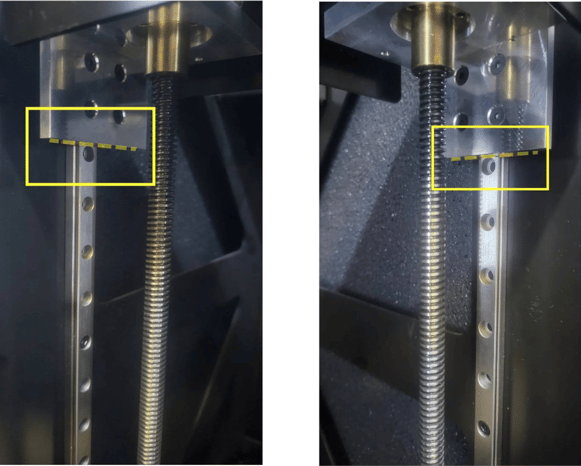
3. Once this is done, both metal plates should be adjusted at the same height.
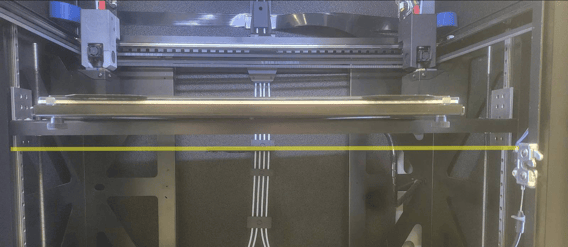
4. Turn on the printer and perform a move operation by going on the Printer Setup menu. Then check that the platoform lowers and rises properly.
/PRINTER%20SETUP%20(1).jpg?width=300&height=501&name=PRINTER%20SETUP%20(1).jpg)
/Build%20plate.jpg?width=300&height=501&name=Build%20plate.jpg)
In case of doubt or failure, please contact our support department.
omega-assistance@bcn3d.com